
G-Guest for studios & classes
Fill the last spots without chasing the group chat.
Live class capacity, a waitlist that refills a late dropout by itself, and attendance that shows who actually came. We build the booking page it runs on, and build it so an AI assistant can read your schedule and take a spot too.
€49 a month for the whole studio
No card. No call. We set it up for you.
G-Guest handles booking, capacity, waitlist and attendance. Keep taking payments the way you do today, or take a prepayment when people book, straight into your own Stripe.
- Classes & spots
- Instructors
- Waitlist
- Attendance
- Drop-ins
At a glance
The first 25 reservations are on us, because we’re sure
We set your page up in a day and place the link on Google, Instagram and your site. Your first 25 confirmed reservations are free, for up to 60 days; then €49 a month, no commission. No card, not a cent until then. And the page is yours to keep: it stays online even if you don’t stay. Your page, the form and every letter to a guest speak eight languages, and the guest gets theirs: we translate, you do nothing.
Live on this page, not a mockup
Book a place in a class right now
The real G-Guest widget, running against a demo studio. Pick a class and a time, and watch the places left change as you do.
A class of twelve sells twelve places and then stops, and the timetable is the one you set. Your classes, your instructors, your rules.
The moment that matters
A dropout refills itself
Every studio knows the 21:00 cancellation for tomorrow’s 18:00 class. Here is what G-Guest does with it, while you sleep.
Reformer Flow
Tue 18:00 · with Maya · 55 min
9 of 12 booked
A spot opened at 16:40, and the next member on the waitlist was told automatically.
Oldest request first, one member per opening. The spot is not held: it goes to whoever books first, and the message says so.
Prepayment, inside the booking
Teach the class. Don't chase the payment
Set a prepayment for a class or a workshop and collect it the moment someone books: per booking or per person, a different amount per class, or none.
G-Guest confirms the place once Stripe says it is paid. The payment link is in their email too, and the place is held until your deadline. An unpaid hold goes back on the schedule by itself.
No spreadsheet of “booked”, “paid” and “I think she transferred it”.
One slot, start to finish
- Available
- Awaiting payment
- Confirmed
Payment window runs out: available again, automatically.
Paid and closed the tab: confirmed anyway, within minutes.
Set the amount
Per booking or per person, and a different amount per service, or none.
Set the deadline
From 30 minutes to 24 hours to pay. The time is held until then.
Keep control
Your Stripe, your refund terms shown before checkout, refunds made by you.
* Online prepayment needs your own Stripe account, available to venues in every EU country, the UK, Switzerland, Norway, Liechtenstein and the US. Stripe's processing fees apply; G-Guest adds no fee of its own. You don't need Stripe to use G-Guest.
Your side of it
And this is what you see
One screen for the week. It opens by a link, with no password and nothing to install, on whatever phone is at the front desk.
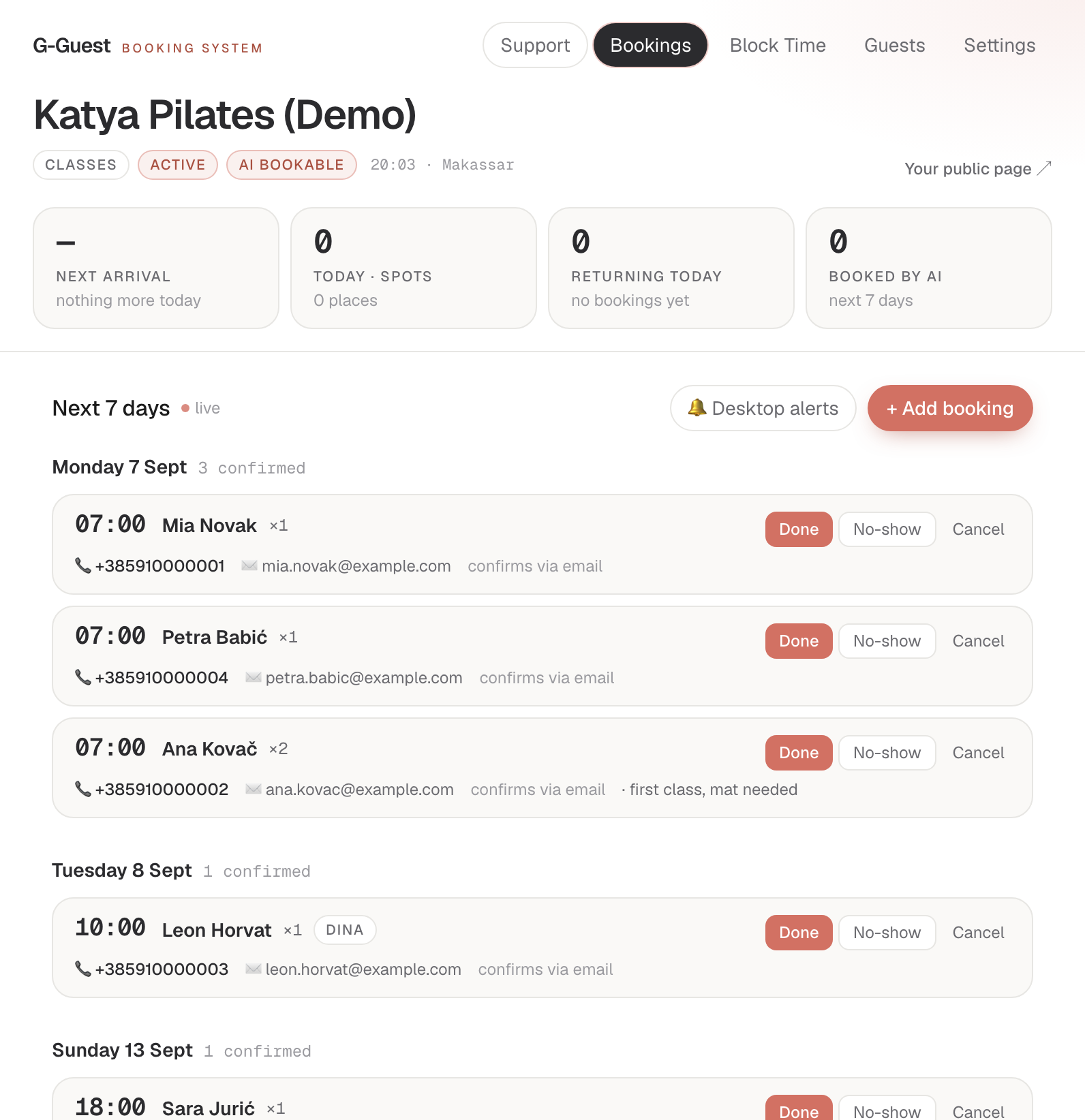
The week, class by class
Every name booked into the week, in class order, with the number of places each booking took. A drop-in is added in two taps.
The button that makes attendance real
Doneon the people who came. That single tap is what turns a sign-up list into attendance, and it is why “regular” here means somebody who actually shows up.
Nobody to teach Thursday
Close the class and it stops being offered. Everyone already booked is told, without you writing to them one by one.
And the screen where your timetable lives
A named class that runs every week, a named teacher people book one to one, and a workshop that happens on one date only. Three different shapes, one timetable, and a teacher booked for a private at nine is never offered for the nine o’clock class.
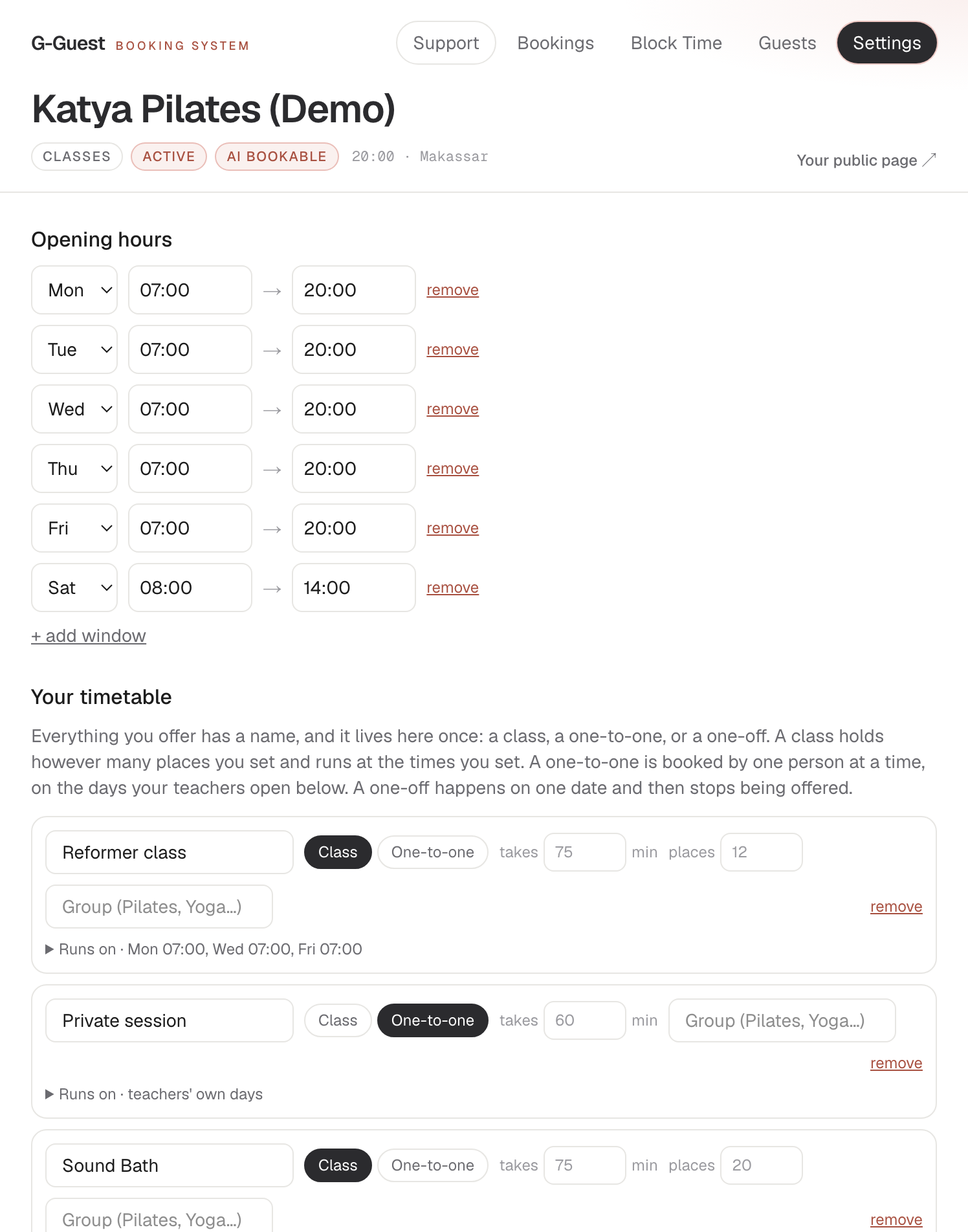
Adding a teacher costs nothing here. Type a name and they are bookable, on the same €49.
A week at the studio
Three moments that cost studios money
21:00 · the night before
Two dropouts from a full class
An empty mat earns nothing. The waitlist refills the spots overnight, with no instructor messaging a group chat and no first-come chaos at the door.
18:05 · class begins
Sign-ups aren't attendance
Twelve booked, nine on mats, and only attendance tells you which. G-Guest counts who actually came, so your numbers describe your classes, not your forms.
the morning of the workshop
The workshop is full. Half of them haven't paid
Take the prepayment as people book. Each place is confirmed only once it is paid into your own Stripe, and an unpaid hold goes back on the schedule by itself. No list of who still owes you.
The whole guest journey
Book. Fill. Know. Review. Return
01Book
Class capacity and real spots: members and their AI assistants book the same availability.
02Fill
A dropout goes to the waitlist queue; the next member is told automatically.
03Know
Attendance, not sign-ups: new faces, returning members, regulars.
04Review
After class, a quiet ask, routed across the platforms you choose.
05Return
With consent, invite a fading regular back, and know when not to message.
Your rules
Fill your classes without filling your inbox
Instant booking without payment is still an option. Ask members to confirm, or take a prepayment when they book: G-Guest follows your setting for every class.
Instant booking
DefaultConfirmed on the spot
- Picks a time
- Confirmed
Nothing to switch on. This is how G-Guest works out of the box.
Guest confirmation
One tap from the guest
- Picks a time
- Taps the link in the email
- Confirmed
Not tapped in time? The slot goes back on sale by itself.
Prepayment
Confirmed by the payment
- Picks a time
- Pays into your Stripe
- Confirmed
The payment is the confirmation. No second step, even with guest confirmation on.
Not paid in time: the slot goes back on sale, nothing is charged.
* Online prepayment needs your own Stripe account, available to venues in every EU country, the UK, Switzerland, Norway, Liechtenstein and the US. Stripe's processing fees apply; G-Guest adds no fee of its own. You don't need Stripe to use G-Guest.
AI Readable · AI Bookable
Built for people. Ready for their AI
An assistant that plans somebody’s week can read your real schedule and book a spot directly. We first measured the booking gap in restaurants, and the infrastructure problem is the same for every business that books limited capacity.
AI Readable
An assistant asked about you reads the facts off your own page: your name and address, the hours you actually keep, and the times that are actually free tonight. It stops reconstructing you from four stale directories, and it hands your guest your booking link, not somebody else’s.
AI Bookable
Real availability and a direct booking action, built for an assistant that can act for its user: the booking completes end to end, with no form to fill, no login and no CAPTCHA, and the confirmation carries a link that changes it.
An assistant that can act completes the booking. One that cannot hands your guest your booking link, because the page reads either way.
People asking AI to find a local business
6%
a year ago
45%
this year · BrightLocal, 2026
?
next year
Right now those assistants cannot see you, so they recommend the place next door instead. Not because it is better: because it can be booked. We make you readable, and bookable, from day one.
No implementation project
How it starts
One short message from you. The rest is ours.
Tell us what gets booked
Your classes, their capacity and length, your instructors and their days: a photo of this week's timetable is enough.
We set everything up
Your public page, your real availability, confirmations and reminders, all configured for you. Nothing to install.
You're live in a day or two
We run a test booking together, and from then on bookings confirm themselves.
One flat price. No fee every time you succeed
G-Guest is a class booking system for studios, yoga, pilates, dance and group training: capacity, waitlist and real attendance, flat at €49 a month + tax. Cancel any month.
Flat means the busier you get, the cheaper it gets: a hundred bookings a month is €0.49 a booking. Every model that charges per booking works the other way round.
And it does not go up when you hire.
Everywhere else you pay per teacher: a monthly fee, then more for each one you add. The systems built for studios price by the person too: a monthly fee, then more for every instructor whose classes you put online. With us the price is the same at one and the same at ten, because your team is your business, not our billing line.
A class marketplace
Your timetable inside their app, their brand on your students, and a cut of the people they say they brought you, including the ones who searched for your studio by name.
A cheap scheduling app
Holds the timetable and no more: no public schedule page of your own, no attendance history turning drop-ins into members, nothing an assistant can book a place in, and setup is on you.
G-Guest
€49 flat, every class and instructor included. Your member list is yours and exports any time, prepayment goes straight into your own Stripe with no cut for us, and we build the whole timetable for you.
- Classes with fixed capacity: spots, sessions, courses, and one-off events on a single date
- Per-instructor schedules and days off, and a personal link so each teacher opens their own dates
- Your own public schedule page, live from day one, no website required
- The same form on your own website: a widget you style to match it, your colours, light or dark, inline or a button, and in the language your page is written in
- A waitlist that refills dropouts automatically, oldest request first
- Attendance, not sign-ups: real member states, new, returning, regular
- Review requests after class, across the platforms you choose
- Return invitations with consent, and a silence rule
- Optional prepayment per class, straight into your own Stripe, no fee from us (confirmed automatically, nothing to check by hand)
- Readable and bookable by AI assistants
- Your concierge: a human on Telegram, timetable, teachers and the widget set up for you
€49 /mo + tax
Local tax added at checkout where it applies. Cancel any month, and your guest base exports with you. Everything stays yours.
One month of places booked
G-Guest
The same at the end of the month as at the start.
€49
A per-place model
and climbing
A monthly fee that rises with every one of these, by cover fee or by a bigger plan.
A good month costs you more everywhere else. Here a good month is just a good month.
FAQ
Class booking system: questions studios ask
I take sign-ups in a group chat and a spreadsheet. What happens to those?
Nothing, until you want it to. We build your timetable in parallel and you keep the chat running. One rule: a class lives in one place at a time. Nothing syncs, so a place promised in the chat is not visible here. Start with one class, or one quiet week, and move the rest when you want to. Nothing has to be migrated, and if you decide against us the chat is exactly where you left it.
Instagram and a Google form are free. Why pay for a booking system?
A form takes a name; it does not hold a place. Somebody still counts the replies, checks the class is not overfull, and writes back, and until they do nobody knows whether they have a mat. What €49 buys is the part after the sign-up: capacity that stops selling at twelve, a waitlist that refills dropouts overnight, reminders, real attendance, and a schedule an assistant can read. And it is the same €49 whether you run four classes a week or forty.
Our site is in two languages. What happens to the booking form?
It follows the page. On your English page the form is in English; on the other one it is in that language, and if a member switches language halfway through, the form switches with them without losing what they have already typed. You set nothing up and paste nothing extra: we build a language once, and from then on it is there for every venue in that country. Your own words stay yours, the name of the studio, the names of your classes and who teaches them, and anything you wrote yourself is never machine translated. Days and months come out in the right language by themselves. Eight languages today: English, Dutch, German, French, Spanish, Italian, Indonesian and Bulgarian. And the guest's confirmation, the reminders and the page where they change or cancel arrive in the language they booked in.
Can some classes take a prepayment while others don't?
Yes. Set an amount per class or service, or zero for no prepayment. Members see it, with your refund terms, before they pay.
What happens to a place that isn't paid for?
It is held for the payment window you set, 30 minutes to 24 hours. If nobody pays before it ends, the place goes back on the schedule automatically and nothing is charged.
Does this replace our memberships or class passes?
No. A prepayment here is for one booking, paid into your own Stripe. Memberships, recurring billing and class passes stay wherever you run them today.
Can I cap the places in a class?
Capacity is the core of it. A 12-place class stops selling at twelve, and from the thirteenth person the queue becomes a waitlist instead of an overfull room. A booking for two takes two places, so the count on the door is the count on the screen.
And when I add a teacher?
You type their name and they are bookable. No per-instructor fee, no per-calendar fee, the same €49. Everywhere else, putting one more teacher online is the thing that raises your bill, which is a strange way to be charged for growing.
My studio is not only weekly classes. Can it hold a workshop, or a private?
All three shapes live in one timetable. A class is a named session that runs at set times and holds however many places you set. A one-to-one is a named teacher booked by one person at a time. A one-off happens on a single date and then stops being offered, which is what a workshop or a retreat day actually is. A teacher booked for a private at nine is never offered for the nine o'clock class.
Do teachers get their own schedules?
Yes, and for one-to-ones a teacher is closed until they open a date themselves, which is the honest default: nobody should be sold an hour they have not offered. Each teacher gets their own link that opens their dates and their own bookings, never your settings and never your member list, and you are told when something moves.
How does the waitlist work when somebody drops out at ten at night?
The freed place is offered to the oldest request first, one member per opening, usually while you sleep and without anyone messaging a group chat. The place is not held: it goes to whoever books first, and the message says so, so nobody feels cheated at the door.
Can I see who actually came, not just who signed up?
That is the whole point of the difference. Bookings and attendance are counted separately, and one tap on the door turns a booking into a visit. No-shows and cancellations never inflate anyone's history, so regular means somebody who really comes, and a fading regular is visible while a friendly nudge can still matter.
Who owns the member list?
You do. We never market to your members, and we never sell you a member of your own back. Names, attendance and notes export to CSV whenever you like, including the day you leave.
Will my members cope with it?
There is nothing to cope with. No account, no app, no password: pick a class, a day and how many places, leave a name and a phone, and the place is confirmed on the spot, or, if you take a prepayment, the moment they have paid on your Stripe page. A link in the email moves or cancels it without messaging you. It is simple enough that an AI assistant can do it, which is the same reason a person can do it in twenty seconds.
How long until it is actually working?
A day or two, and almost none of it is yours. Send your classes, how long each runs, how many places it holds, who teaches and on what days. A photo of this week's timetable is enough. We build it, run a test booking together, and from then on places confirm themselves.
And if I want to leave?
Cancel any month, no notice and no call to keep you. Your member list exports with you. The schedule page we built stays online with your name, address and hours, so nobody lands on a dead link, and it stops taking bookings until you come back and switch it on again, which you can do any time.
For studios & classes